To support your patients in their Weight Loss Journey, BN Healthy has partnered with Bodymapp to offer your patients 3 months FREE Bodymapp Premium Access.
All your patient needs to do is purchase $80 worth of any product on the BN Healthy website, using your Dietitian Referral Code, including:
BN Chews and BN Caps
BN Protein and Collagen
BN Chews Chocolate
Books and Shapewear
They will then receive an email from BN Healthy 3 Month Free Bodymapp Access Code.
What is Bodymapp?
Bodymapp is a 3D body scanning app that allows people to measure and track their body composition using their mobile device*.
With Bodymapp, your patient can measure and track their Pre and Post Surgery changes anywhere anytime.
Key Features:
3D Avatar + Avatar Comparison
Personalised Health Report
Goal Setting + Progress Tracking
How Bodymapp Works
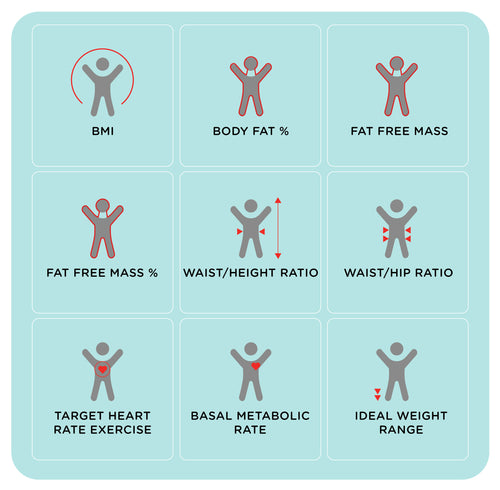
Bodymapp uses the depth sensor in mobile devices* to map the external contours of your patient’s body and transform it into a 3D avatar true to body shape. Measurements are accurate within 3-4% of a DEXA scan and circumference within +/- 3-8 inch. The app uses algorithms to calculate 20 health metrics based on circumference measurements, surface area and more.
Bodymapp uses the depth sensor in the mobile device* to capture the 3D contours of your patient’s body, similar to how it’s used for facial recognition. It’s non-invasive and safe for everyone to use - even pregnant women. The infrared sensor cannot scan through clothing, so it’s recommended that your patient wear tight-fitting activewear or underwear during a scan.
Bodymapp Respects Your Client’s Privacy
For privacy, Bodymapp does not capture any photographic images. The heat map generated by the scan is what gets uploaded for processing in monochromatic form.
*Compatible mobile devices are iPhones X-14 Pro and iPad Pro Series 11 and 12. The scan must be completed using one of these devices. However, the app and health report is accessible on both Apple and Android devices.
Bodymapp Frequently Asked Questions
3D Body Mapping
Bodymapp uses the depth sensor in iPhone X-14 Pro and iPad Pro Series 11 and 12 to create a 3D avatar of your body and capture your body and health measurements. With this 3D scan and health data, you can track your changes over time to support your weight loss journey.
Yes, Bodymapp uses non-invasive infrared technology, similar to TV remote controls or facial recognition on your mobile device. The app does not use X-rays, anything that involves penetrative scanning or even photographs. It’s safe for everyone to use, even for pregnant women, children, people with pacemakers or other implants.
Accuracy depends on the depth sensor contained in the device that you use to scan with the app. The closer you are to the depth sensor, the warmer the colours of the heat map. It’s important that you stand as close as you can to the depth sensor during the scan for the greatest accuracy.
Following the scanning instructions also helps improve the success of your scans.
Generally, the circumference measurements are accurate to within +/- 1cm, and body fat percentage estimate is accurate to within 3-4% of a DEXA scan.
The depth sensors cannot see or scan through clothes. Therefore, it is recommended that during the scanning process you remove your loose fitting outer clothing and scan in tight-fitting undergarments or active wear or swimming wear. This will let the sensor capture your body shape and measurements accurately.
Bodymapp takes customer privacy very seriously. The app was developed so that you can scan anytime in the privacy of your own space.
Extra precautions are taken to not capture any photographic imagery or unnecessary data for privacy purposes. The heat map that is used to create your 3D avatar is what gets uploaded for processing in black and white. The information, such as date of birth, height and weight that the app asks you to fill in is data that is required to be able to generate an accurate health report.
No! Bodymapp does not use the RGB camera module in the phone so no photos are captured or stored. Instead, the app uses the heatmap generated by the infrared depth sensor and not realistic imaging or colours.
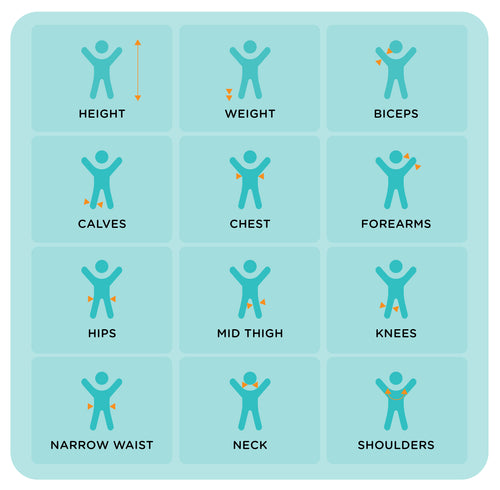
Solely tracking weight is not an accurate measure of your health. By learning key body measurements and body composition metrics, you can gain a deeper insight into health risks or improvements that simple weight and height measurements can’t tell you. Body scanning also lets you monitor the effectiveness of your weight loss program, by showing you changes in your body composition beyond what you can see on the scales.
Bodymapp 3D body scanning can only be done using iPhones X-14 and iPad Pro models.
This is because Bodymapp utilises the depth sensor in Apple devices (the same one used for Face ID). If the device has Face ID, then it is compatible with the app.
The Android app is for people who are scanning using a Bodymapp Pro iPad Scanning Station, set up in their gym or health facility OR using a family member or friend's Apple device to scan. The Android app can be used to receive scan results from scans that have been done on a compatible iPhone or iPad and to track health metrics and access the health report on the Android phone.
Your 3D Mapping Sessions
Follow the instructions as per the scan tutorials within the app. Stand as close to the phone as possible and keep your body visible within the frame. Standing too far away from the mobile device can reduce the accuracy of your measurements.
Pause after each turn at the required angle so the technology recognises your body at all angles.
Stay in the scan posture and avoid changing your posture during the scan. If you do move out of the scan posture for whatever reason, please cancel the scan and restart a new one.
Keep your back straight and keep your chin level.
If you have long hair, tie it up in a bun and make sure it doesn’t cover your neck.
Changes in the way you stand or breathe can have an effect on your body measurements. For example, if you deeply inhale while scanning, this can affect your chest, stomach and waist measurements.
Also, the distance you stand from the depth sensor may produce differences in your measurements. Try and stand as close as possible to the phone while remaining in the dotted frame. Ideally, you should aim for the colours of the heat map to be red or dark orange.
If you want to know your measurements to track the course of your weight loss, muscle gain or fitness goal then it is recommended to measure anywhere from weekly to once every 30 days.
We know some screen protectors can block the sensor that the app uses for body scanning.
Some screen protectors cover this sensor, but most screen protectors do not interfere with scans. Screen protectors with cut outs for the front sensors, as well as glass screen protectors, do not interfere with the scan.
If the screen protector blocks Face ID from working, then the app won’t work because it uses the same sensor. If Face ID works with the screen protector, then Bodymapp should also work.
My Account
If you are new to Bodymapp, you can add a promo code in the last step of sign up (the same step that you enter your email address and password).
If you already have an account, and you are using an iPhone, you can redeem a promo code in the app by heading to the ‘More’ menu (three dots in the bottom right corner) and tapping on ‘Got a code?’
If you already have an account and you are using an Android device, click on this link https://bodymapp.co/redeem, sign into your Bodymapp account and use your code.
No, only one person per subscription.
It usually takes 4-5 minutes, however it can take longer during peak times when multiple people are scanning at the same time.
You cannot enter a promo code on the Android version of the app. You are only able to enter a promo code when you first sign in and create your profile. However, if you are an Android user, follow this link https://bodymapp.co/redeem to the Bodymapp website to and sign in on the website to redeem your Promo Code.
No. You will need to use a different email address for every Bodymapp account.
If you do wish to cancel you can do this from the app. You can login to the app, click on the 3 horizontal dots icon (“More” page), click on Settings and follow the prompts to delete your account.
Deleting your account means you will be logged out straight away and have no more access to your scan history forever. You will not be able to retrieve your scan history even if you re-create another account using the same email address as the previous account. If you wish to keep your scan history but stop paying, you can cancel your premium subscription in your phone settings, which will downgrade you to a free account.
If you signed up using the Bodymapp website or Android app, you can cancel by emailing support@mport.com.au
I have been eating these BN Chews for years because I had very low vitamin levels in my body and ...
I have been eating these BN Chews for years. Started taking them because of very low vitamin levels in my body. My vitamin levels are now perfect and I will continue to eat these chews. They taste great too 👍😊